
Linking clients to your account (organisation accounts only)
If you have an organisation account with us and you are acting on a client’s behalf you can link that client to your account. For example, if you are a law firm or collection agency representing a client. This allows you to file claims with us on behalf of your client. In our system we refer to this as related creditors.
How to add a related creditor
Account administrators can add new related creditors.
- Log in
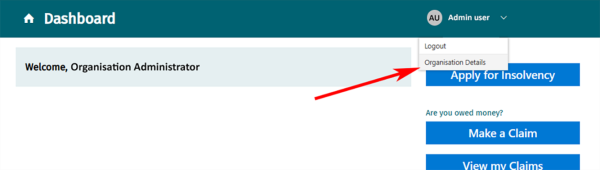
- Select your name at the top of your dashboard.
- From the drop-down menu select Organisation Details.
- Go to Related creditors and select Add Creditor.
- Provide:
- the creditor’s name and address.
- an email address for communications from us about the creditor’s claims.
- a contact telephone number.
- You can choose to opt out of receiving creditor reports via email.
- Save.
You can now make claims for this creditor
You and other users in your organisation can now register claims for this creditor when you log in.