Using your dashboard
When you log in, we will display your online dashboard. Your dashboard will help you access the online services you need.
If your account is for your own use
The dashboard allows you to do the following:
- Apply online for an insolvency procedure.
- Debt Repayment Order
- No Asset Procedure, or
- Bankruptcy.
- Complete your bankruptcy statement of affairs online (if made bankrupt by the court).
- Keep your personal information up to date with us, such as changes to your:
- address
- employment status, or
- income.
- (Bankruptcies only) Apply online for permission to:
- travel outside of New Zealand
- run a business, or
- work for a member of your whanau (family member) or a business they control.
- File and view your claims online if you are owed money by:
- someone who is under an insolvency procedure, or
- a company where the Official Assignee is the liquidator.
View and manage your applications
From the dashboard you can track the progress of your application, from applying through to acceptance.
If you change your mind before you submit your application, you can delete your application.
After you have applied, you can withdraw or edit your application — but only if we have not yet accepted it.
If you use an account on behalf of an organisation
The dashboard allows you to do the following:
- Update your organisation’s name and contact details.
- File and view claims for money owed to your organisation.
- Link clients to your account to file and view claims for money they are owed.
- If you are an administrator, you can add and remove users for your organisation.
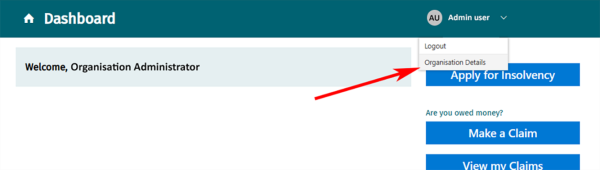
How to access organisation details
- Log in
- Select your name at the top of your dashboard.
- From the drop-down menu select Organisation Details.